Skip to main content Skip to search Skip to main navigation
Go to homepage
Wolfmix W1 MK3

Standalone (no computer required)

Compatible with any DMX device

Up to 4 DMX universes (2048 channels. Add-on required for U3+4)*

Up to 680 spotlights & beams

Up to 50 fixture types

Up to 5000 fixture properties (colour/gobo etc...)

8 fixture groups

6 projects

15,000+ available fixtures (3,500+ on the controller)

DMX address, fixture order and group settings

Use as a DMX splitter with DMX universe mapping

WLINK synchronisation with a second Wolfmix (add-on)


: technical specifications

4.3" colour TFT with tinted glass

Capacitive touchscreen

37 silicone buttons with a matt oil finish

4 push encoders with acceleration

LED colour backlight

Omnidirectional electret microphone

3.5 mm jack socket (Line-In)

Analogue adaptive peak detector

2x 3-pin DMX OUT XLR connectors

1x 5-pin DMX OUT XLR connector

1x 5-pin DMX IN/OUT XLR connector with WLINK

USB-C port – 900 mA required

(USB 3.0 rating)

USB-A port (MIDI/MSD)

High-speed USB communication

The Wolfmix W1 MK3 is a fully standalone DMX lighting controller designed for live performances, clubs, nightclubs and touring setups – no computer required. As the successor to the popular W1, the MK3 offers exceptionally intuitive operation with 37 backlit silicone buttons, a 4.3” capacitive touchscreen and four push encoders with acceleration. The result: fast programming, a clear overview and precise control – ideal for mobile DJs, lighting technicians and rental companies who need reliable show control on the fly.


With up to four DMX universes (U3+U4 via add-on), large setups with up to 680 spotlights and beams can be controlled – from moving heads and LED bars to fog machines, hazers and lasers. An extensive fixture library with over 15,000 devices (including 3,500+ directly on the controller) and the integrated Fixture Builder speed up patching. Addressing, group assignment and the mapping of multiple DMX universes can be carried out directly on the device; if required, the W1 MK3 can even function as a DMX splitter with universe mapping.


For dynamic shows, the Color FX, Move FX and Beam FX modules are available – each with eight effect types. Static colour, position and gobo palettes per group, 20 nameable Live Edit buttons, six dedicated Flash buttons and 100 presets with hold and fade times support flexible, high-performance operation. An 8-step real-time sequencer, X-Y position grid and an RGBW colour picker make it easy to create and vary looks during the gig.


The Wolfmix W1 MK3 synchronises effects via either the built-in electret microphone, the 3.5 mm line input or a BPM source. Ableton Link, OS2L and MIDI Clock are available for precise tempo control; Bluetooth is also on board. Two Wolfmix controllers can be synchronised via WLINK (add-on), simplifying larger rig setups and redundant configurations. Practical features such as global FX speed, Freeze, 16-bit pan/tilt and multi-beam LED bar control round off the live workflow.


Under the bonnet is a 220 MHz ARM CPU with 8 MB RAM and 16 MB flash – the controller boots up in under two seconds and sends DMX in less than a second. Updates and backups are conveniently carried out via the WTOOLS app using USB-C High-Speed; offline 3D visualisation with Easy View (add-on) supports show planning. Security and service functions such as password lock, automatic project recovery and a factory firmware recovery mode ensure smooth operation.


Whether for a compact club, wedding, corporate event or town festival stage: the Wolfmix W1 MK3 combines an interface designed specifically for live operation with a powerful effects engine, broad device compatibility and reliable standalone performance. This means you can keep your light show under control at all times – without a laptop, but with maximum flexibility.

Nicolaudie

Ansprechpartner:

Nicolaudie France
838 rue de l’Aiguelongue
FR - 34090 Montpellier

E-Mail: info@wolfmix.com
Web: https://wolfmix.com/de/home

    : Safety and Warning Instructions

    This product contains electronic components and/or is powered by electricity.

    Please use it strictly in accordance with the operating instructions and with suitable accessories.

    ⚠️ Protect the device from moisture, extreme temperatures and mechanical damage.

    ⚡ Check cables, power adapters and connections regularly for visible damage.


    ℹ️ Please refer to the enclosed user manual for further safety instructions.

    ℹ️ If you have any questions regarding safe use, please do not hesitate to contact our customer service team.

0 of 0 reviews

Average rating of 0 out of 5 stars

Leave a review!

Share your experiences with other customers.


Zubehör

Magma CTRL Case Wolfmix
Manufacturer:
€37.83*
Decksaver Wolfmix W1 MK3
Manufacturer:
€37.83*
Rock Shop Case Safe Box 3 black, 330x280x120 mm
Manufacturer:
The ideal protective case for your expensive devices and valuables! Protects against moisture (by means of an O-ring seal), dust, shocks and is also impact-resistant thanks to the rib-reinforced outer geometry. With handle and pressure equalisation valve for easy opening after use at extreme heights or temperatures. Inner padding with additional configurable cube foam for precise customisation to requirements.
€46.56*
Wolfmix WING
Manufacturer:
Fusion Power!Connect WING to W1, and the two devices merge into a single integrated system. The modes transition seamlessly into one another. WING’s motorised faders complement the W1’s touchscreen, and as both devices are based on the same powerful Beam Engine, they provide a combined total of up to 8 DMX universes.WING ModesCUE LISTChoreograph your show.Use a CUE LIST to play back a series of presets in the desired order for songs, scenes or performances.Create a CUE LIST by selecting presets that suit the moment. You can stack up to five presets at a time, with each controlling a different element – for example, colour in one and movement in another. A single press of the dedicated OK/GO button triggers the next cue.Set fade-in and fade-out times as well as hold times, automatically jump back and forth between cues, or follow the MIDI timecode to ensure the lighting remains perfectly synchronised with the rest of the production.CONTROLGet down to the nitty-gritty.CONTROL organises all your spotlights in the WING matrix. Select one or more from any group and adjust them using the faders. Once you’ve achieved the desired look, press OK/GO to save it directly as a preset.Choose which parameters are assigned to which faders, so you always have the controls you need at your fingertips. With the group filters, the scroll encoder and the selection macros, you can quickly find and select exactly the spotlights you want.With up to 32 individual edits per preset, you can create looks with a level of detail that was simply not possible before.MAPPINGShape your vision.Everyone has their own way of running a show – which is why mapping lets you customise the user interface to suit you. Assign W1 functions to the faders and matrix buttons across four pages and arrange them to suit your workflow.Set aside one page for dimmers and presets, another for FX parameters, and another for whatever else your show requires. Anything you haven’t assigned sends a generic MIDI message, so these faders and buttons can control your external MIDI hardware and software, including audio and video.Combine the four pages as you wish, and WING becomes the sole user interface through which you control the entire show.SUBGROUPSDivide and conquer.Each group can now be split into eight sub-groups, allowing you to select a handful of spotlights and control them separately. Divide your uplighters into ‘Stage Left’, ‘Centre’ and ‘Stage Right’, then switch on one side without affecting the others.With subgroups, you can also split a single spotlight. With a moving head featuring a pixel ring, you can group the light beam into one subgroup and the ring into another, allowing you to control both separately.As WING has been merged with W1, the subgroups extend throughout the entire system. Apply flashes, solo or reverse effects from all of W1’s main modes to them.IMPROVED W1 MODESEverything else has now been improved even further.WING enhances every original W1 mode by displaying the controls relevant to the task at hand.In the ‘COLOR FX’, ‘MOVE FX’ and ‘BEAM FX’ modes, the parameters are displayed directly on the faders, so you can shape an effect simply by touching it, rather than having to search for it.All eight groups are available to you at the same time, so you don’t have to switch between pages to find the one you want. Tap a dedicated group button to expand colours, positions and gobos via the WING matrix.Edit a colour and use the faders to adjust the components; edit a position and gain access to pan, tilt, fan and cross.MIDI controlWING works with any device that supports MIDI. Connect WING to your computer via USB-C, load the MIDI mapping for your software and select WOLFMIX-WING as the source.If there is no mapping available for your software, use its learn mode to assign WING’s faders and matrix buttons yourself.
€920.53*

Cutsomers also bought

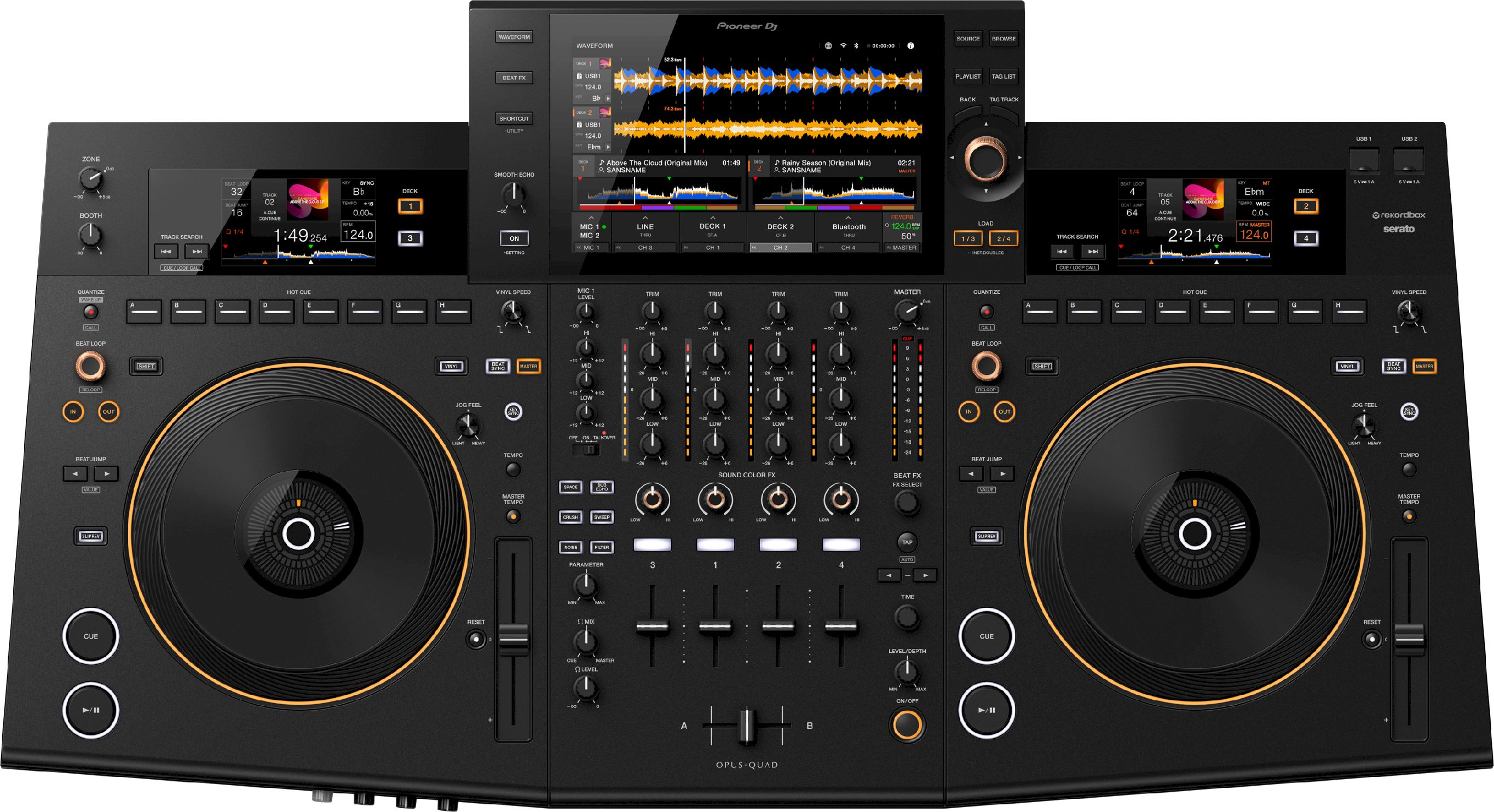
Pioneer OPUS-QUAD
Manufacturer:
This new professional all-in-one DJ system puts you in control of the music like the conductor of an orchestra. It creates harmony between beautiful design and playability and includes new and advanced features such as stand-alone 4-deck playback. All this combines to provide a spectacular DJ experience that you can use to inspire your audience in any room or venue.
€3,299.00*

Unsere Marken